HunterPie v2 – Overlay and Rich Presence Mod is designed to improve your Monster Hunter World experience by providing an overlay with useful in-game information and integrating with Discord to show your activity. It’s a tool that helps you track monsters, manage resources, and share your gaming status with friends.

Features Of HunterPie v2 – Overlay and Rich Presence Mod
HunterPie v2 offers a comprehensive set of features to enhance gameplay, making it a valuable tool for players. This mod includes features like a Monster Widget for tracking enemy details, a Damage Meter for performance stats, and Discord Rich Presence to let friends see what you’re doing. It also supports automatic updates and has a plugin system for customization, which is an unexpected detail for those used to simpler mods.
- Discord Rich Presence: Displays your current activity in Discord, including quest details, character information, and more, allowing friends to see what you’re doing in real-time.
- Overlay Widgets:
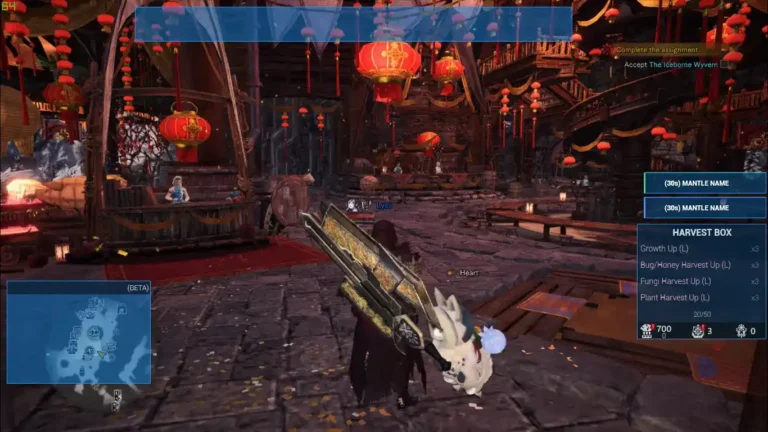
- Monster Widget: Shows monster parts, ailments, enrage timer, crown, and weaknesses, helping players strategize during hunts.
- Harvest Box Widget: Tracks fertilizer duration, items, steam fuel, argosy, tailraider, and expiration dates, aiding in resource management.
- Specialized Tool Widget: Tracks mantle cooldowns and other timers, ensuring optimal use of tools.
- Damage Meter Widget: Displays total damage, DPS, player classes, HR, MR, and quest time, useful for performance tracking.
- Abnormalities Widget: Shows status effects from Hunting Horn, palico’s orchestra, elemental debuffs, and consumables, up to 5 trays, enhancing combat awareness.
- Class Helper Widget: Provides current weapon information, assisting with weapon-specific strategies.
- Honey Hunters World Integration: Offers one-click gear link for build sharing, making it easy to share and compare builds with the community.
- Decoration & Charms Exporter: Exports to Honey Hunters World string format, simplifying build documentation.
- Automatic Updates: Keeps the mod up to date with the latest features and fixes, ensuring compatibility and functionality.
- Plugin System: Allows users to create custom extensions, offering flexibility for advanced users.
- Easy Configuration: Features a user-friendly settings tab, eliminating the need for manual configuration file editing.
- Localization Support: Available in multiple languages with auto-updates, catering to a global audience.
These features collectively enhance the visual and functional appeal of Monster Hunter World, making the gameplay experience more enjoyable and personalized.
Key Points
- HunterPie v2 is likely a popular overlay and rich presence mod for Monster Hunter World, enhancing gameplay with real-time data and social features.
- It seems to offer Discord integration, various widgets like damage meters, and automatic updates, making it user-friendly.
- Installation appears straightforward, requiring .NET 6.0 and basic mod knowledge, with compatibility for the latest game versions.
- Research suggests users appreciate its functionality, though some report overlay display issues, often resolved by running in borderless mode.
|
Category |
Details |
|---|---|
|
Mod Name |
HunterPie v2 – Overlay and Rich Presence Mod |
|
Description |
HunterPie v2 is a modern, robust, and clean overlay with Discord rich presence integration for Monster Hunter World. It provides a range of features to enhance your gaming experience, including real-time game data, social integration, and utility tools. |
|
Author |
haatos |
|
Original Upload |
February 2, 2022 |
|
Last Updated |
September 13, 2024 |
|
Requirements |
|
|
Compatibility |
Compatible with the latest version of Monster Hunter World, supporting both base game and expansions. |
Installation and Compatibility
Installing HunterPie v2 is straightforward, with options for both automatic and manual installation:
To install, download from Nexus Mods, ensure .NET 6.0 is installed, and follow the installer steps. It’s compatible with the latest Monster Hunter World versions, including expansions, making it accessible for most players.
- Automatic Installation
- 1. Download HunterPie v2 Installer from above Download Link.
- 2. Run the installer, follow steps until installation is complete.
- 3. Run the executable to enjoy HunterPie.
- Manual Installation
- Warning: Avoid extracting to Desktop and C:\Program Files (x86) as they may cause permission issues.
- 1. Ensure .NET 6.0 is installed.
- 2. Download HunterPie from Nexus Mods (zip file).
- 3. Extract zip file somewhere on your computer (avoid Desktop and C:\Program Files (x86) due to potential permission issues).
- 4. Run the executable to enjoy HunterPie.
Screenshots


Compatibility and Requirements
- Monster Hunter World installed
- .NET 6.0 or higher
- Basic mod installation knowledge
- Remove any old versions of the mod to avoid compatibility issues
- Compatible with the latest version of Monster Hunter World, supporting both base game and expansions.
Ensure your game is updated to the latest version for full compatibility. The mod was last updated on September 13, 2024, so check the mod’s page for any recent notes or updates.

The overlay isn’t displaying correctly.
Does the mod track damage by type (raw/element)?
Achievements not being tracked in offline mode.
Troubleshooting
If users encounter problems, here are some troubleshooting tips:
- Mod Not Showing Up: Ensure that the files are in the correct location and the game is running in borderless mode, as specified in the installation instructions.
- Game Crashes or Slow Performance: Disable other mods to check for conflicts, a common issue noted in community discussions.
- Outdated Game Version: Make sure your game is updated, as mods may not work with older versions, especially given the mod’s last update was on September 13, 2024.
- For further assistance, users can visit the mod’s page on Nexus Mods or ask questions in the comments or on the official Discord server.
This comprehensive guide ensures that even users with limited technical knowledge can install and enjoy the mod, enhancing their Monster Hunter World experience with HunterPie v2.
This web site is really a walk-through for all of the info you wanted about this and didn’t know who to ask. Glimpse here, and you’ll definitely discover it.